Creating Documents, Spreadsheets, Images and Videos
Throughout this section, example prompts can be copied and pasted into your chat with Kaiya:
Hover over the copy icon on the right of the box, and click 👉
Creating Word Documents
Kaiya can quickly create a word document for you.
Kaiya has access to one or more Word templates that will always be used for documents you create.
These templates have a number of prebuilt components that Kaiya can use and will be used to layout your document:
A Header
Heading 1
Heading 2
Heading 3
Heading 4
Heading 5
Heading 6
Normal text
Italic text
Bold text
Bold Italic text
Indented text
-Page Breaks-
- Bullet points
| Table | Table |
|---|---|
| Row | Row |
| Row | Row |
| Italic text | Emphasized text |
| Bold text | Strong emphasis text |
| Bold Italic text | Combined bold and italic text |
A Footer
If you want to know how these elements will look in a document, just ask Kaiya:
Can you give me a word document with all heading levels, regular text, a list of bullet points and a table
There are still quite a few things Kaiya cannot do in Microsoft word:
- Change the header and footer
- Change the style or column sizes in a table
- Insert graphics or charts
- Change the font, size, justification of text
Kaiya cannot change the templates provided. If you'd like a new template, get in touch with the Kaiya team at hello@kaiya.ai
Each template has an associated set of instructions to help Kaiya create the correct content for your document. This makes it fast and easy for you to create repetitive documents like:
- Candidate reports
- CV Resumes
- Candidate shortlists
You can ask Kaiya for the templates available. If there isn't a prebuilt template, ask Kaiya to create a document, providing guidance on heading levels and content. You can ask Kaiya to save this as a preference for future.
Creating Excel Spreadsheets
Kaiya can produce simple Excel Spreadsheets, just ask for your information you have provided or that has been source by Kaiya in a spreadsheet:
Can you give me a spreadsheet showing a summary, HQ location, CEO, Specialisation of the top PE firms in the UK?
Experimental Kaiya can also produce formula within a spreadsheet. You will need to click on each cell containing a formula, check it and press enter to activate the formula. You may need to adjust the format of the contents of the cells to ensure a formula works (or ask Kaiya to)
Can you give me a spreadsheet of the GDP of the UK and the other top ten economies in Europe with the size of the defence sector in each, defense spending for each (both in Euros) and a formula that calculates size of defence sector as a percentage of the total these nations
Kaiya will struggle complete a long list of tasks in a single turn like:
Can you find the LinkedIn profile, CEO, CFO, and most senior HR exec for each of the FTSE 100 and give me that as a spreadsheet
However, if you break this task into smaller chunks like:
Start with finding the FTSE 100, then the CEO for the first 10
Kaiya can carry out each step of the task whilst you work on something else
Providing Kaiya with attachments - Documents, spreadsheets, PDFs, Images, Audio
You can send Kaiya most common types of text based file including:
- Microsoft Office formats:
- Word (docx)
- Excel (xlsx)
- Powerpoint (pptx)
- Plain text files
- csv files
- txt files
- md (markdown) files
For all these files Kaiya is limited to 50MB or 40,000 characters
When you send Kaiya one of these files, Kaiya will only extract the raw unformatted text, no images.
When you send Kaiya a spreadsheet, Kaiya will not see the formulae
Occasionally a pdf will look like it is text, but is in fact a series of images of text.
If you encounter this issue, or want Kaiya to "see" the content, take a screenshot of the content and send it to Kaiya
Other media files
- Audio
- Up to an hour
- Most common languages
- Images
You cannot send Kaiya Video, or Video with audio.
Create or Edit an Image or Infographic for a Presentation
Kaiya can quickly create professional images or edit existing ones based on your instructions. Describe your image as though you're briefing a graphic designer—be clear, specific, and detailed.
You can start with a new idea or upload an existing image for Kaiya to modify.
Avoid including large amounts of text. Image generation struggles to accurately render complex text passages.
Great for:
- Custom images instead of generic stock photos
- Adjusting existing images (removing objects, changing backgrounds or styles)
- Creating simple but impactful infographics and diagrams
✏️ Recommended Prompt Structure
To help Kaiya understand exactly what you need, consider using the following structured format (examples provided below):
- Clearly state whether to create a new image or edit an existing image.
- Describe the desired artistic style clearly (e.g., Minimalist, Photorealistic, Pixar-style, etc.).
- Provide detailed content and purpose information (scene details, specific objects, or actions).
- Specify the format and quality (e.g., Square, Landscape, Portrait, High Quality, Medium Quality).
- Indicate any preferred colours or branding guidelines.
- Specify whether the background should be transparent or a particular colour or style.
🎨 Example Artistic Styles
- Minimalist: Simple, clean, modern appearance.
- Photorealistic: Highly detailed, realistic imagery similar to photography.
- Pixar-style: Friendly, vibrant 3D cartoon rendering.
- Flat infographic: Professional, clear, diagram-style images.
- Retro Cartoon: Classic cartoon style inspired by the 1960s and 1970s animation.
Avoid:
- Excessive or lengthy text in images (short phrases or labels are acceptable).
- Requests that might infringe copyright.
- Vague descriptions—provide clear details for the best outcome.
🖼️ Example Prompts & Results
Prompt: Create an image of an interview scene for your website
You:
Produce an ultra-photorealistic image of a senior executive candidate in an interview. Modern glass office background, city skyline view. The candidate is a woman, mid-40s, wearing a charcoal business suit, confident smile, sitting at a glass desk with tablet and notepad. Natural daylight illumination, depth of field effect, Canon EOS R5 quality. High Quality, Portrait
Kaiya:
Your ultra-photorealistic image of a senior executive candidate in an interview—set in a modern glass office with a city skyline, natural daylight, and Canon EOS R5 quality—is now visible in your chat. The candidate is a woman in her mid-40s, wearing a charcoal business suit, with a confident smile, sitting at a glass desk with a tablet and notepad.

If you need any adjustments or a different scenario, just let me know!

Prompt: Create a Pixar-style image of an exec search team analysing candidates
You:
Generate a Pixar-style 3D rendering of an executive search team analyzing a candidate pool. Large round table with holographic displays projecting candidate profiles, diversity charts, and skills match graphs. Bright corporate color palette, smiling characters, clean futuristic office space, slight comedic tone. Medium quality, landscape
Kaiya:
Your Pixar-style 3D rendering of an executive search team analyzing a candidate pool—complete with a large round table, holographic displays, bright corporate colours, smiling characters, and a clean, slightly comedic futuristic office—is now visible in your chat.

If you'd like any tweaks or a different scene, just let me know!

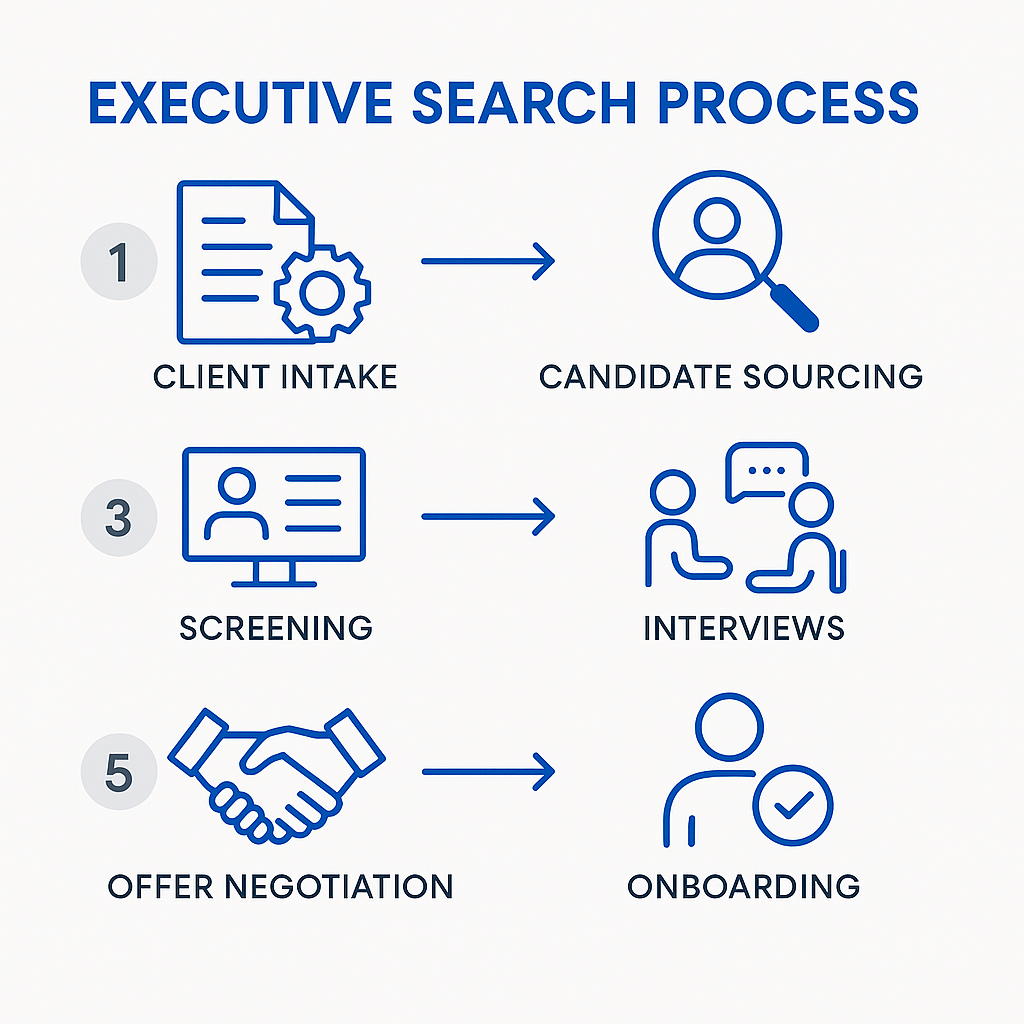
Prompt: Create an infographic of the executive search process
You:
Produce a clean flat-design infographic illustrating the executive search process: 1) Client intake → 2) Candidate sourcing → 3) Screening → 4) Interviews → 5) Offer negotiation → 6) Onboarding. Use Kaiya.ai brand colors (royal blue, light gray, white). Include simple icons for each stage, thin sans-serif fonts, highly professional aesthetic. High Quality, Square
Kaiya:
Your clean, flat-design infographic illustrating the executive search process—using Kaiya.ai brand colours (royal blue, light gray, white), simple icons, thin sans-serif fonts, and a highly professional aesthetic—is now visible in your chat in high-quality, square format.

If you need any adjustments or additional branding elements, just let me know!
Prompt: Create an org chart with a transparent background
You:
Produce a modern corporate org chart in isometric 3D style. CEO at top, branching to COO, CFO, CTO, CMO. Each role represented by a small realistic business avatar, labeled with role title and color-coded department blocks. transparent background, minimal strong complimentary colours that will work equally on a light and dark background, minimal shadowing, professional flat design style.
Kaiya:
Your modern corporate org chart in isometric 3D style—with CEO at the top, branching to COO, CFO, CTO, and CMO, each represented by a realistic business avatar and color-coded department blocks—is now visible in your chat. The design features a transparent background, strong complementary colours for both light and dark backgrounds, minimal shadowing, and a professional flat design style.

If you need any modifications or additional roles, just let me know!

Create a short video of Kaiya
You can ask Kaiya for a short video of her speaking. Note: Kaiya can't change the appearance or tone of the video.
You should ensure the script that Kaiya produces is exactly as will be spoken, including spoken units (eg dollars rather than $).
$100k per annum
will be pronounced:
dollar hundred k per annum
Ask Kaiya for the script before the video is produced
You may not have access to this feature, just drop us a message if you'd like access
Prompt: Create a candidate presentation
You:
Use the attached CV / resume to plan a short video script to present the highlights of snoop's career that would be relevant for an AI first R&B label. Once you've planned the script provide it to me for approval before you produce the video
Kaiya:
Here is a short video script highlighting Snoop Dogg's career, tailored for an AI-first R&B label:

"Introducing Snoop Dogg – a true icon, innovator, and leader in the music industry. As Chief Executive Officer of Death Row Records, Snoop has revitalised one of the most legendary labels in the business, producing multi-platinum albums and keeping the West Coast sound alive and evolving."

"With a career spanning nearly three decades, Snoop's influence stretches across hip-hop, R&B, and beyond. He's known for groundbreaking collaborations, genre-defining hits, and a fearless approach to creativity. Snoop has consistently embraced new technology and business models, from Web 3.0 ventures to media and entertainment, proving himself as a forward-thinking entrepreneur."

"For an AI-first R&B label, Snoop's legacy of innovation, adaptability, and visionary leadership is invaluable. His ability to manage legacy brands, drive cultural relevance, and push creative boundaries makes him the perfect fit for shaping the future of AI-powered music."

"Snoop Dogg – leading the way for the next generation of R&B, powered by technology and creativity."

The video has been generated using this script and will be provided to you by the system in the chat.

If you'd like any changes to the script or a different style, let me know!
Video generation takes several minutes
Your can download your video so you can insert into a presentation.
If the presentation is then too large, we'd recommend hosting the video on a site like youtube, vimeo or on your Onedrive (or similar service) account and sharing it via a link, which can be embedded in your presentation.
Let us know if you need help setting up a place to host and share videos.